


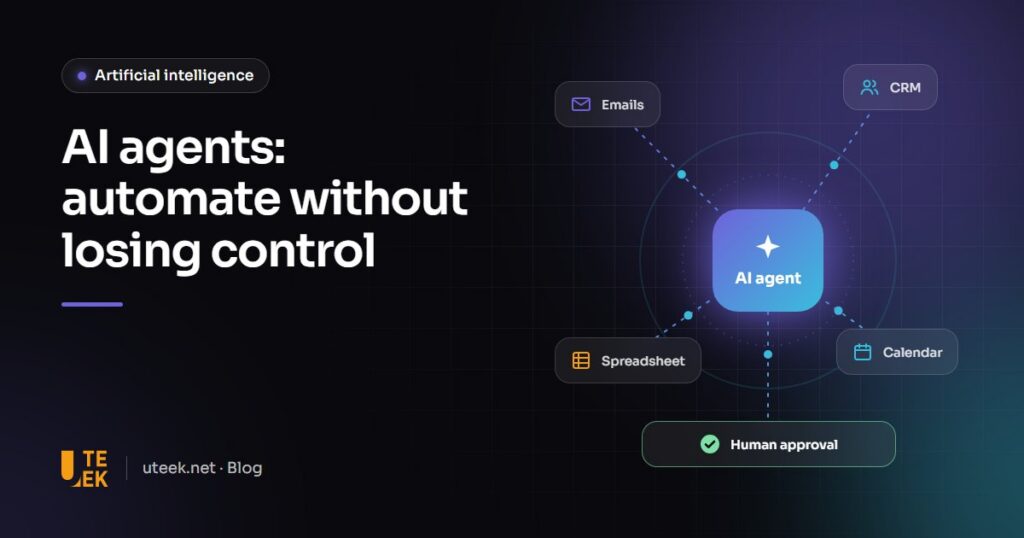
AI agents for business are programs that do more than answer questions: they are given a goal, choose the steps and act in your tools (email, CRM, spreadsheets, calendar) to reach it. They handle what classic automation cannot, such as a free-form request. For an SME, the sensible approach is to start with one well-defined process, with human approval on every sensitive action.
Key takeaways
- An AI agent combines a language model, connected tools and rules: it plans, acts and checks the result.
- Useful SME use cases: triaging requests, qualifying leads, quotes, invoices and first-line support.
- Safety relies on least-privilege access, human approval, logs and protection against prompt injection.
- Start with one measurable process in “draft mode”, then gradually extend the agent’s autonomy.
What is an AI agent?
An AI agent pursues a goal by chaining actions together: asked to “process quote requests”, it reads an email, looks up the customer in the CRM, checks the result and carries on until the task is done or a person needs to step in. It relies on three components:
- A language model that understands instructions, emails and documents.
- Tools connected to your email, CRM or ERP, each with specific permissions. Open standards such as the Model Context Protocol (MCP) make these connections easier.
- Rules: what the agent does alone, what needs approval, when to stop.
AI agent, chatbot or classic automation: what is the difference?
| Criterion | Classic automation | AI chatbot | AI agent |
|---|---|---|---|
| Principle | Fixed if-then rules | Answers in natural language | Chains actions towards a goal |
| Actions | Always the same steps | Answer, redirect | Chooses the steps and acts in your tools |
| Predictability | Complete | Good within a defined scope | Variable, needs guardrails |
| Running cost | Very low | Moderate | Higher: several model calls |
| Best for | Stable, repetitive processes | Frequent questions | Varied tasks that need interpretation |
The rule of thumb: if a process can be fully described by rules, classic automation will be more reliable and cheaper.
Which use cases suit an SME?
Triaging incoming requests
The agent reads emails and form submissions, identifies the topic, language and urgency, creates the ticket and drafts a reply.
Qualifying leads
It completes the CRM record, applies your criteria and suggests the next step: a meeting, documentation or a hand-over to a salesperson.
Preparing quotes and documents
Based on the request and your price list, it prepares a draft quote that a salesperson reviews and sends.
Matching invoices
It compares invoices, purchase orders and delivery notes, then flags discrepancies to the accounts team.
Monitoring and alerts
Low stock, a late delivery, a negative review: the agent spots the change and alerts the right person.
First-line support
It answers common questions from your knowledge base and passes everything else to an adviser.
How do you deploy an AI agent safely?
An agent acts inside your systems: a mistake can become an email sent or a record changed. Six safeguards are essential.
- Human approval for sensitive actions: sending to a customer, payments, deletions, price changes.
- Least-privilege access: a dedicated account limited to the permissions it needs, read-only where possible.
- Logs: every step and every decision is recorded.
- Confidentiality: send the model only what it needs, choose business plans that do not train on your data, and comply with Tunisian data protection rules and, for European customers, the GDPR.
- Prompt injection: an email or web page can hide instructions designed to hijack the agent. OWASP ranks prompt injection as the top risk for language model applications: treat all external content as data, never as instructions.
- Costs: a single task can trigger several model calls, so set caps per task and per month.
How to get started: a 6-step method
- Choose a process that is frequent, time-consuming and low-risk.
- Document the current procedure: steps, rules, exceptions, time spent.
- Define the scope: accessible tools, permitted actions, actions that need approval.
- Start in draft mode: the agent proposes, the team approves everything for several weeks.
- Measure: proposals accepted without changes, time saved, errors, cost per task.
- Extend autonomy gradually to the actions that have proven reliable.
What are the limits of AI agents?
An AI agent remains a probabilistic system: it can misread a request, pick the wrong tool or go round in circles. And a process your team finds unclear will confuse the agent too.
According to a Gartner forecast published in June 2025, over 40% of agentic AI projects will be cancelled by the end of 2027 due to escalating costs, unclear business value or inadequate risk controls. Gartner also notes that many use cases marketed as agentic do not actually need an agent.
FAQ
What is the difference between an AI agent and a chatbot?
A chatbot answers questions in a conversation. An AI agent pursues a goal and acts in your tools: it reads, sorts, completes and prepares. The two are often combined.
Can an AI agent work with our existing tools?
Yes, provided your software offers an API or a connector. MCP and platforms such as n8n, Make or Zapier make this easier; legacy software without an API needs custom development.
Is our data safe?
It depends on the architecture. Business plans that exclude training on your data, restricted access and logs keep the risk under control. For the most sensitive data, models hosted on your own servers are an option.
How long does it take to launch a first agent?
An agent limited to one clear process can be tested within a few weeks, provided the procedure is documented and access is ready. Then plan a draft-mode phase to measure its reliability.
Your first AI agent with Uteek
Uteek, a digital agency based in Les Berges du Lac 2, Tunis, designs artificial intelligence solutions connected to your existing tools, from process analysis to integration. We start by identifying which tasks deserve an agent and which ones simple automation can handle. Explore our work or tell us about your project.
Related articles
AI chatbot for your website: how it works, integration and limits
A well-designed AI chatbot answers 24/7 from your own content and hands over to a human when needed.…
AI for business: 7 practical use cases for SMEs
Customer assistants, automated invoice reading, sales forecasting… AI is no longer just for large corporations. 7 practical use…
RAG: how to search your internal documents in plain language with AI
Procedures, contracts, technical manuals: RAG lets your teams question your documents in plain language and get answers with…