


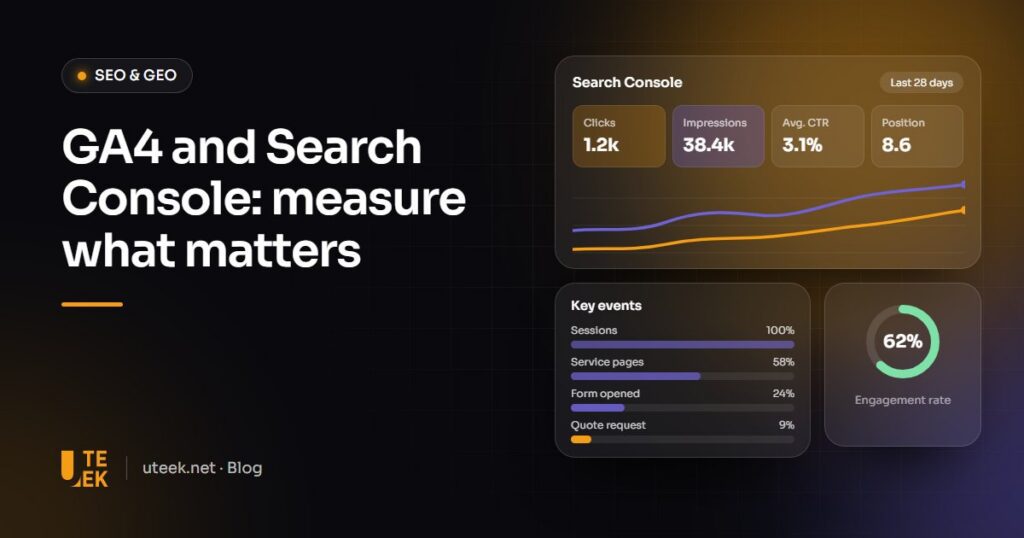
Google Analytics 4 and Search Console are two free Google tools that measure two moments in your visitors’ journey. Search Console shows what happens in Google before the click: impressions, clicks, queries and indexing. GA4 measures what visitors do next on your site, up to a quote request. Together, they show which pages draw visitors, which convert and where to act first.
Key takeaways
- Search Console measures your visibility in Google; GA4 measures visitor behaviour on your site.
- GA4 now talks about key events rather than conversions.
- Consent, internal traffic and UTM parameters determine how reliable your data is.
- A 30-minute monthly routine is enough to decide what to improve.
What does each tool measure?
Search Console: before the click
Search Console uses Google Search data, with no code to install. Its Performance report shows four metrics by query, page, country and device:
- Impressions: how many times your site appeared in search results.
- Clicks: how many clicks led to your site.
- CTR: clicks divided by impressions.
- Average position: the average position of your site’s top result.
It also flags non-indexed pages, accepts your sitemaps and tracks Core Web Vitals.
GA4: after the click
GA4 records events through a tag installed on your pages:
- Users and sessions: how many people visit, and how often.
- Engaged sessions: visits lasting more than 10 seconds, or with two page views, or with a key event; their share of all sessions is the engagement rate.
- Traffic sources: organic search, direct, social networks, referring sites, campaigns.
- Key events: the actions that matter to you. Since March 2024, Google has kept the word “conversion” for Google Ads.
Why do you need both?
Search Console reveals that a page appears often but gets few clicks; GA4 tells you whether its visitors go on to request a quote. One tool alone only shows half the journey.
| Question you ask | Tool | Report or metric |
|---|---|---|
| Which searches does my site appear for? | Search Console | Performance: queries |
| Do my titles earn clicks? | Search Console | CTR by page |
| Are my pages indexed? | Search Console | Page indexing |
| Where do my visitors come from? | GA4 | Traffic acquisition |
| How many quotes does the site generate? | GA4 | Key events |
| Which queries bring engaged visitors? | GA4 linked to Search Console | Search Console reports |
Is traffic from AI measured?
Partly. Clicks and impressions from AI Overviews and AI Mode are counted with web search in the Performance report, mixed with other results. Available to all sites since 31 August 2026, the Generative AI performance report isolates their impressions, not their clicks, once there are enough of them. In GA4, the AI Assistant channel groups visits from ChatGPT, Gemini or Copilot, excluding Google’s own AI features.
How do you set up GA4 and Search Console?
- Create a GA4 property and a web data stream, with enhanced measurement switched on.
- Install the Google tag through Google Tag Manager or, on WordPress, with Site Kit, Google’s plugin.
- Connect your cookie banner to Google’s consent mode.
- Add a Domain property in Search Console, verified through a DNS record.
- Submit your XML sitemap in the Sitemaps report.
- Link Search Console to GA4, then publish its reports from the GA4 Library.
- Define your key events: form submissions, quote requests, clicks on your phone number or WhatsApp.
- Exclude internal traffic (office IP addresses), testing the filter first: its effect is permanent.
- Add UTM parameters (utm_source, utm_medium, utm_campaign) to your campaign links, in lower case.
Enhanced measurement already detects outbound clicks (including WhatsApp) and some form submissions: check them, add phone number clicks if needed, then mark them as key events.
What should you check each month in 30 minutes?
- Search Console: clicks and impressions compared with last month and last year.
- Rising and falling queries and pages, with branded queries separated if possible.
- Important pages flagged as not indexed.
- Slow URL groups in the Core Web Vitals report.
- GA4: key events by channel, compared with real enquiries.
- Three actions for the next month, each with an owner.
How do you turn data into action?
- Many impressions, few clicks: rewrite the title and meta description.
- A page losing clicks: check whether its position or only its CTR is falling (an AI Overview may explain it), then refresh the content.
- Traffic but no key events: make the call to action more visible and simplify the form.
- Indexing errors: fix the cause shown, then request indexing through URL Inspection.
What are the limits of these figures?
- Consent: declined cookies reduce GA4 data; advanced consent mode models part of it if volume allows.
- Thresholds: GA4 hides rows when user numbers are too low.
- Sampling: only above 10 million events per query, rare for an SME.
- Retention: explorations only cover 2 or 14 months depending on your setting; choose 14 months.
- Search Console: 16 months of history, about 48 hours’ delay, hidden queries and counting errors, such as one affecting impressions from 13 May 2025 to 27 April 2026.
FAQ
Are GA4 and Search Console really free?
Yes. Google Analytics 360, the paid version, is aimed at large organisations; the standard version is enough for an SME. The real cost is set-up and analysis time.
Why don’t Search Console clicks match GA4 sessions?
Google counts every click, whereas a session only exists if the tag loads and the visitor allows it. Declined cookies and ad blockers create the gap: compare trends, not values.
Do you need a cookie banner to use GA4?
For visitors in the European Union, consent is generally required before setting analytics cookies; also consider Tunisian data protection law. Connect your banner to Google’s consent mode.
Is Site Kit enough for a WordPress site?
To get started, yes: this free Google plugin installs the GA4 tag, connects Search Console and shows key figures in WordPress. Plan for Google Tag Manager for specific events, and a separate consent tool.
Set up your website measurement with Uteek
At Uteek, a digital agency based in Les Berges du Lac 2, Tunis, we set up measurement and reporting when we build or redesign a website: GA4, Search Console, consent and key events matched to your goals. Explore our web development services or tell us about your project.
Related articles
SEO and GEO in 2026: how to get your website found on Google and cited by AI assistants
GEO doesn't replace SEO, it builds on it. Here is a practical method to get your website found…
Multilingual website in French, English and Arabic: SEO and UX best practices
One URL per language, hreflang tags, keyword research in each language and a proper right-to-left layout: best practices…
Google Business Profile: the complete guide to optimising your listing and attracting local customers
Categories, opening hours, photos, reviews, consistency with your website… A complete Google Business Profile gets you seen on…