


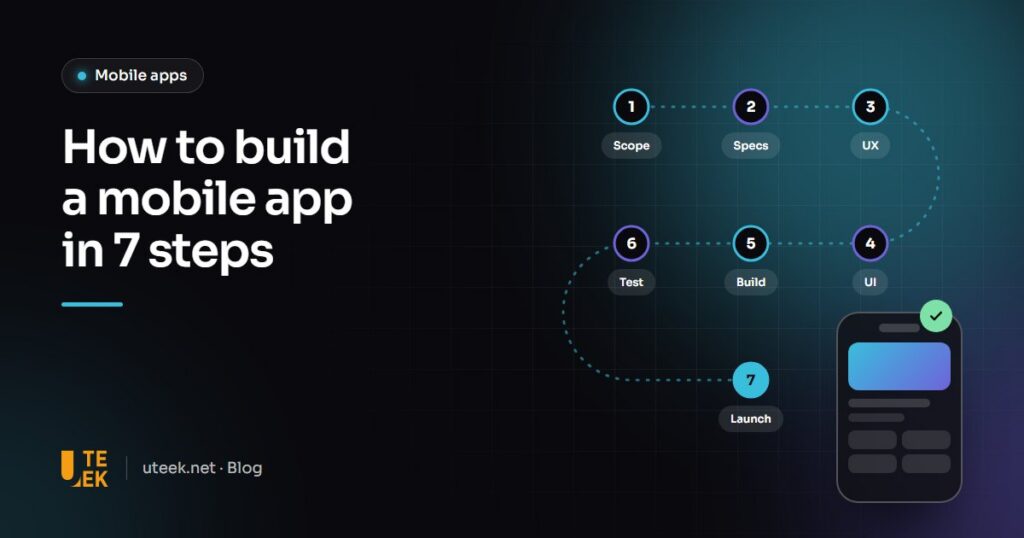
To build a mobile app, you follow seven steps: scope the project, write the specifications, design the user experience (UX), create the interface (UI), develop the app and its back office, test it, then publish it on the App Store and Google Play before improving it over time. Each step produces an approved deliverable that secures the next one, which prevents unpleasant surprises at the end of the project.
Key takeaways
- Scoping and UX are a small share of the budget but prevent most of the rework.
- Aim for an MVP first: the essential features, done well.
- Testing on real devices and a beta phase are essential before release.
- Launch is not the end: analytics, updates and maintenance are part of the project.
Step 1: scope the project
Goals, target users, competitors, business model, success metrics: scoping answers the question “why this app, and for whom?”. It is also when you define the MVP (minimum viable product), the first version that already delivers value.
Deliverable: scoping note and prioritised feature list.
Step 2: write the specifications
Features are described as user stories (“as a customer, I want to track my order”) along with their business rules. The specifications also cover integrations (payments, ERP, CRM), languages, security constraints and the technology choice: native, cross-platform or PWA.
Deliverable: functional requirements and technology choice.
Step 3: design the UX
User journeys, screen map, wireframes and then a clickable prototype. The prototype is tested with a few real users: fixing a journey at this stage costs far less than after development.
Deliverable: approved prototype.
Step 4: create the UI
Your brand identity is translated into screens: typography, colours, icons, animations and component states. A design system gathers every component to ensure consistency and speed up development. Apple’s and Google’s platform guidelines are taken into account.
Deliverable: final designs for every screen and a design system.
Step 5: develop
Development runs in two- to three-week sprints, each ending with a demo. It covers the mobile app itself, but also the back office (content, user and order management) and the API that connects them. External integrations are built and tested along the way.
Deliverable: testable builds at the end of each sprint.
Step 6: test
Functional testing, testing across devices and iOS and Android versions, performance and security testing, then client acceptance. A beta phase through TestFlight (Apple) or Google Play internal testing lets a small group try the app before launch.
Deliverable: signed-off acceptance report.
Step 7: launch and improve
Publishing requires a developer account on each store (an annual membership with Apple, a one-time registration fee with Google), a polished store listing (screenshots, description, keywords) and compliance with each platform’s rules. After launch, you track usage, reviews and crashes, and plan updates, especially for every new iOS and Android release.
Deliverable: published app, monitoring dashboard and maintenance plan.
Summary of the steps
| Step | Goal | Deliverable |
|---|---|---|
| 1. Scoping | Define the why and the MVP | Scoping note |
| 2. Specifications | Describe the features | Requirements document |
| 3. UX | Validate the journeys | Tested prototype |
| 4. UI | Design the screens | Designs and design system |
| 5. Development | Build the app and back office | Builds per sprint |
| 6. Testing | Make it reliable | Approved acceptance |
| 7. Launch and monitoring | Release and improve | Live app, maintenance plan |
FAQ
How long does it take to build a mobile app?
For a well-scoped MVP, allow three to six months from scoping to release in many cases. A feature-rich app with many integrations takes longer.
Should I launch on iOS and Android at the same time?
It is usually better, so you reach the whole market. A cross-platform technology such as Flutter or React Native lets you release on both with a single codebase.
How long does app store review take?
Apple’s and Google’s reviews usually take from a few hours to a few days. Build some margin into the schedule, especially for a first release.
Who owns the app and its code?
You should. The contract must provide for the transfer of the source code and for publishing the app under your own developer accounts.
Build your app with Uteek
Uteek supports every step, from scoping to maintenance, for native, cross-platform and PWA mobile apps, such as the Jobito recruitment app. Let’s talk about your app.
Related articles
Native, cross-platform or PWA: how to choose your mobile app technology in 2026
Swift and Kotlin, Flutter and React Native, or a simple PWA? A clear comparison of the three approaches…
Website redesign: the SEO checklist to keep your traffic
A poorly prepared redesign can wipe out years of search visibility. Inventory, 301 redirects, testing and monitoring: the…
UX/UI design: 8 mistakes that drive users away (and how to fix them)
Confusing navigation, endless forms, tiny buttons… These 8 UX/UI mistakes cost businesses customers every day. Here is how…